Contrast Adjustment
Theory
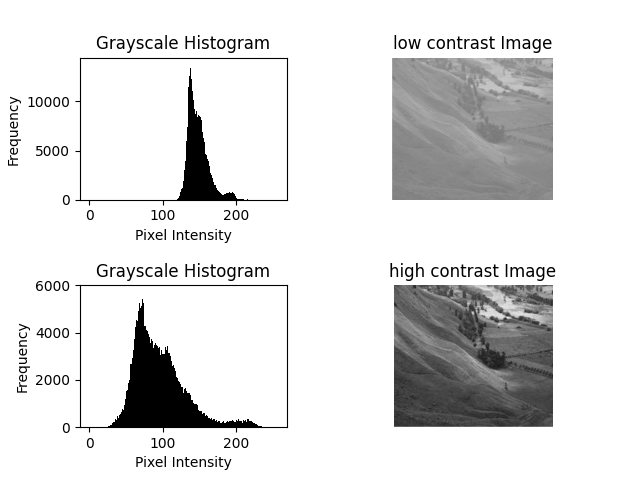
Contrast adjustment is a fundamental image enhancement technique used to improve the distinction between light and dark regions in an image. By scaling pixel intensity values, the visibility of features becomes more pronounced, making details easier to analyze.
1. How it Works
Each pixel intensity in an image can be transformed using a simple linear formula:
s = α * r + βr– Original pixel intensitys– Adjusted pixel intensityα– Contrast scaling factor (α > 1 increases contrast, 0 < α < 1 decreases contrast)β– Brightness offset (positive values brighten, negative values darken)
2. Applications
- Enhancing image visibility for visual inspection or presentation.
- Preprocessing images for computer vision tasks such as object detection or segmentation.
- Correcting low-contrast images captured in poor lighting conditions.
Proper contrast adjustment improves image quality without altering the underlying content.
Python Code
import cv2
import matplotlib.pyplot as plt

# Load grayscale image
img = cv2.imread("assets/sample.jpg", 0)

# Contrast and brightness adjustment
alpha = 1.5   # Contrast factor
beta = 0      # Brightness offset
adjusted = cv2.convertScaleAbs(img, alpha=alpha, beta=beta)

# Display original and adjusted images
plt.subplot(1, 2, 1)
plt.imshow(img, cmap='gray')
plt.title("Original")
plt.axis('off')

plt.subplot(1, 2, 2)
plt.imshow(adjusted, cmap='gray')
plt.title("Contrast Enhanced")
plt.axis('off')

plt.tight_layout()
plt.show()
Example Output