Thresholding Techniques
Theory
Thresholding is a fundamental technique for image segmentation. It converts a grayscale image into a binary image (or modified binary) by classifying pixels based on intensity values. Pixels are compared against a chosen threshold value, and the output depends on whether they are above or below this value.
Thresholding is widely used for:
- Segmenting objects from the background.
- Enhancing features in preprocessing steps for computer vision tasks.
- Reducing computational complexity for further analysis.
Common thresholding types include:
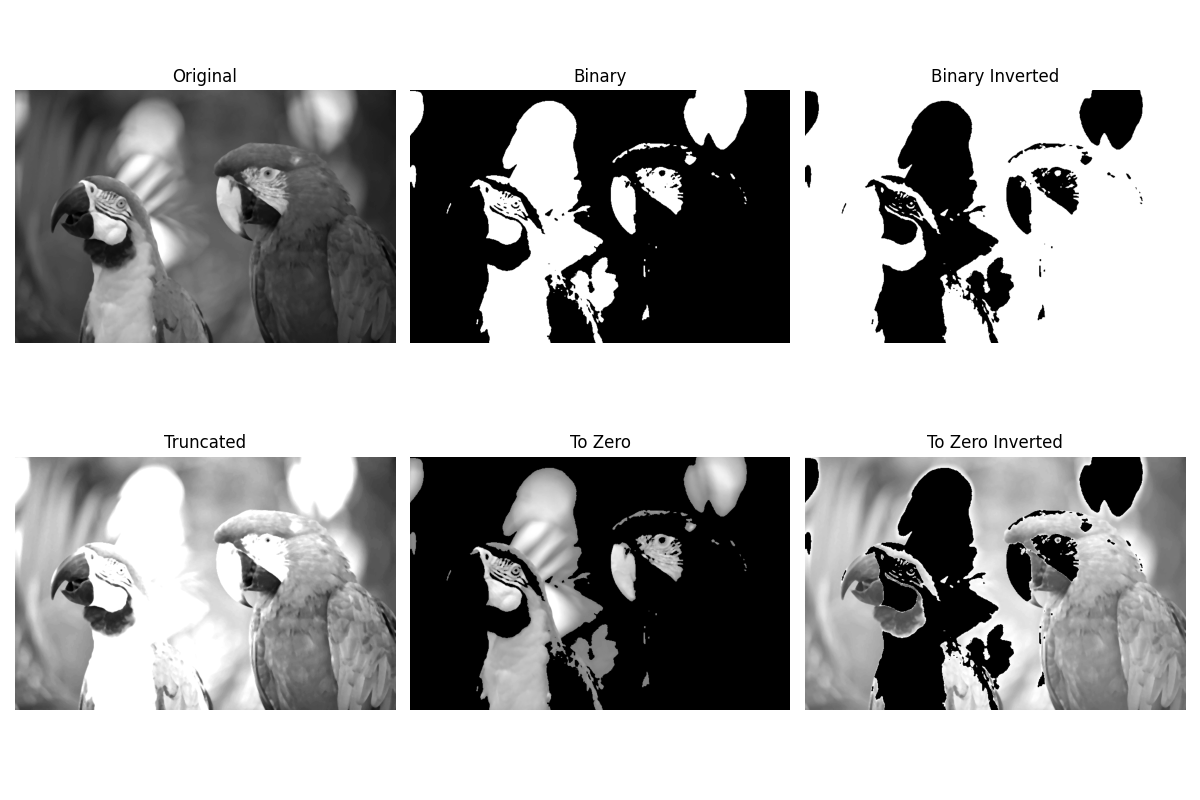
- Binary Threshold: Pixels above the threshold are set to max value (white), below set to 0 (black).
- Binary Inverted: Inverts binary output; pixels above threshold become 0, below become max value.
- Truncated: Pixel values above threshold are set to the threshold value; below threshold remain unchanged.
- To Zero: Pixels below threshold are set to 0; above threshold remain unchanged.
- To Zero Inverted: Pixels above threshold are set to 0; below threshold remain unchanged.
Threshold selection can be manual (fixed value) or automatic (methods like Otsu or adaptive thresholding), depending on image characteristics.
Python Code
import cv2
import matplotlib.pyplot as plt

# Load grayscale image
img = cv2.imread('assets/bird.png', cv2.IMREAD_GRAYSCALE)
img = cv2.medianBlur(img, 5)  # Reduce noise

# Apply different thresholding methods
_, binary = cv2.threshold(img, 127, 255, cv2.THRESH_BINARY)
_, binary_inv = cv2.threshold(img, 127, 255, cv2.THRESH_BINARY_INV)
_, trunc = cv2.threshold(img, 127, 255, cv2.THRESH_TRUNC)
_, tozero = cv2.threshold(img, 127, 255, cv2.THRESH_TOZERO)
_, tozero_inv = cv2.threshold(img, 127, 255, cv2.THRESH_TOZERO_INV)

# Display results
plt.figure(figsize=(12, 8))
plt.subplot(2, 3, 1); plt.imshow(img, cmap='gray'); plt.title("Original"); plt.axis("off")
plt.subplot(2, 3, 2); plt.imshow(binary, cmap='gray'); plt.title("Binary"); plt.axis("off")
plt.subplot(2, 3, 3); plt.imshow(binary_inv, cmap='gray'); plt.title("Binary Inverted"); plt.axis("off")
plt.subplot(2, 3, 4); plt.imshow(trunc, cmap='gray'); plt.title("Truncated"); plt.axis("off")
plt.subplot(2, 3, 5); plt.imshow(tozero, cmap='gray'); plt.title("To Zero"); plt.axis("off")
plt.subplot(2, 3, 6); plt.imshow(tozero_inv, cmap='gray'); plt.title("To Zero Inverted"); plt.axis("off")
plt.tight_layout()
plt.show()
Output