Image Arithmetic & Logical Operations
Theory
Arithmetic and logical operations are essential in digital image processing. They allow us to combine, manipulate, or analyze images in a pixel-wise manner, which is useful for tasks like blending, masking, highlighting differences, or extracting regions of interest.
1. Arithmetic Operations
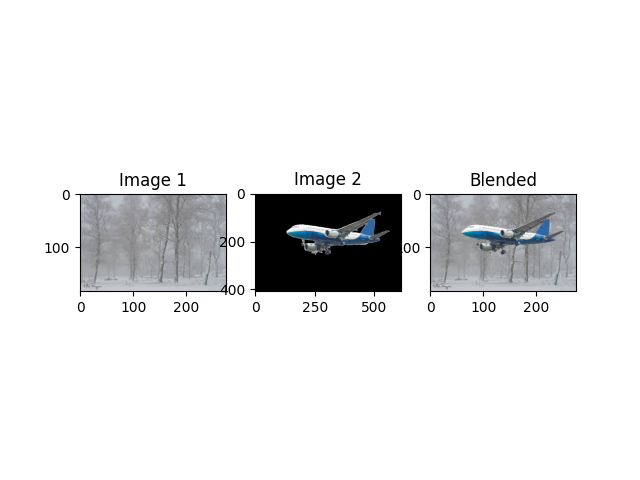
- Addition: Combines pixel values of two images to create a blended output. Useful for overlaying images or alpha blending.
- Subtraction: Highlights differences between two images, often used for motion detection or change detection.
- Multiplication / Division: Adjust pixel intensities for scaling brightness or applying masks.
2. Logical Operations
Logical (bitwise) operations are applied at the binary level for each pixel. Common operations include:
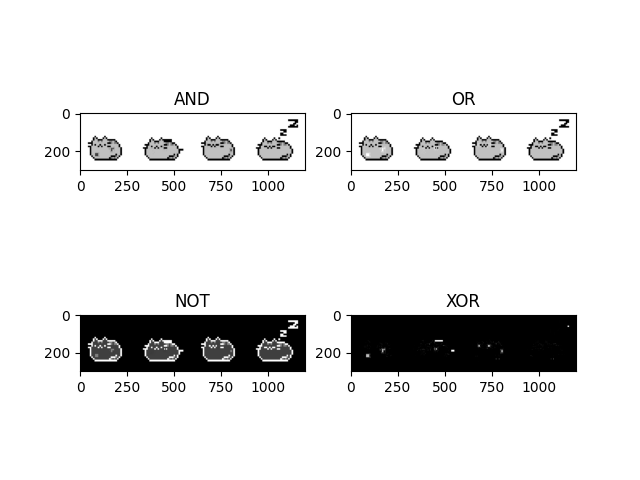
- AND: Keeps overlapping pixel regions where both images are non-zero.
- OR: Combines non-zero regions from both images.
- NOT: Inverts the pixel values of an image.
- XOR: Highlights pixels that differ between two images.
3. Applications
These operations are widely used in image processing pipelines for:
- Image blending and compositing
- Masking and region extraction
- Highlighting differences between images
- Preprocessing for computer vision tasks
Python Code
import cv2
import numpy as np
import matplotlib.pyplot as plt

# --- Addition Example ---
def add_example():
    img1 = cv2.imread('assets/towers.jpg')
    img2 = cv2.imread('assets/plane.png', cv2.IMREAD_UNCHANGED)

    # Resize img2 to match img1
    img2_resized = cv2.resize(img2, (img1.shape[1], img1.shape[0]))

    # Split channels and alpha
    bgr_img2 = img2_resized[:, :, :3]
    alpha_channel = img2_resized[:, :, 3] / 255.0

    blended = np.zeros_like(img1, dtype=np.float32)
    for c in range(3):
        blended[:, :, c] = (1 - alpha_channel) * img1[:, :, c] + alpha_channel * bgr_img2[:, :, c]

    blended = np.uint8(blended)

    # Display
    plt.subplot(1,3,1); plt.imshow(cv2.cvtColor(img1, cv2.COLOR_BGR2RGB)); plt.title("Image 1")
    plt.subplot(1,3,2); plt.imshow(cv2.cvtColor(img2, cv2.COLOR_BGR2RGB)); plt.title("Image 2")
    plt.subplot(1,3,3); plt.imshow(cv2.cvtColor(blended, cv2.COLOR_BGR2RGB)); plt.title("Blended")
    plt.show()

# --- Logical Operations Example ---
def logical_example():
    img1 = cv2.imread('assets/cat.jpg')
    img2 = cv2.imread('assets/cat2.jpg')

    plt.subplot(2,2,1); plt.imshow(cv2.bitwise_and(img1,img2)); plt.title("AND")
    plt.subplot(2,2,2); plt.imshow(cv2.bitwise_or(img1,img2)); plt.title("OR")
    plt.subplot(2,2,3); plt.imshow(cv2.bitwise_not(img1)); plt.title("NOT")
    plt.subplot(2,2,4); plt.imshow(cv2.bitwise_xor(img1,img2)); plt.title("XOR")
    plt.show()

# Run examples
# add_example()
logical_example()
Example Output
Below are example outputs of arithmetic and logical operations: