Affine Transformations
Theory
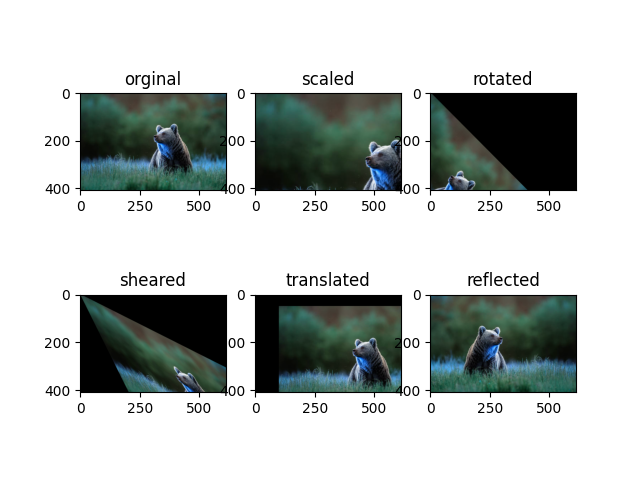
Affine transformations are linear geometric transformations that preserve points, straight lines, and planes. They are widely used in image processing to manipulate image geometry without altering the parallelism of lines.
Types of Affine Transformations
- Scaling: Enlarges or shrinks the image.
- Rotation: Rotates the image around a fixed point.
- Shearing: Slants the image along the x or y axis.
- Translation: Moves the image position.
- Reflection: Flips the image across an axis.
Implementation
Affine transformations are applied using transformation matrices with cv2.warpAffine().
Each type of transformation has a specific matrix representation.
Python Code
import cv2
import numpy as np
import matplotlib.pyplot as plt

# Load the image
img = cv2.imread('assets/bear.jpg')
rows, cols, _ = img.shape

# 1. Scaling
scale_matrix = np.array([[1.5, 0, 0], [0, 1.5, 0]], dtype=np.float32)
scaled_img = cv2.warpAffine(img, scale_matrix, (cols, rows))

# 2. Rotation (45 degrees)
theta = np.radians(45)
rotation_matrix = np.array([[np.cos(theta), -np.sin(theta), 0],
                            [np.sin(theta),  np.cos(theta), 0]], dtype=np.float32)
rotated_img = cv2.warpAffine(img, rotation_matrix, (cols, rows))

# 3. Shearing
shear_matrix = np.array([[1, 0.5, 0], [0.5, 1, 0]], dtype=np.float32)
sheared_img = cv2.warpAffine(img, shear_matrix, (cols, rows))

# 4. Translation
translation_matrix = np.array([[1, 0, 100], [0, 1, 50]], dtype=np.float32)
translated_img = cv2.warpAffine(img, translation_matrix, (cols, rows))

# 5. Reflection
reflected_matrix = np.array([[-1, 0, cols], [0, 1, 0]], dtype=np.float32)
reflected_img = cv2.warpAffine(img, reflected_matrix, (cols, rows))

# Display results
plt.figure(figsize=(12, 6))

plt.subplot(2, 3, 1)
plt.imshow(cv2.cvtColor(img, cv2.COLOR_BGR2RGB))
plt.title('Original')
plt.axis('off')

plt.subplot(2, 3, 2)
plt.imshow(cv2.cvtColor(scaled_img, cv2.COLOR_BGR2RGB))
plt.title('Scaled')
plt.axis('off')

plt.subplot(2, 3, 3)
plt.imshow(cv2.cvtColor(rotated_img, cv2.COLOR_BGR2RGB))
plt.title('Rotated')
plt.axis('off')

plt.subplot(2, 3, 4)
plt.imshow(cv2.cvtColor(sheared_img, cv2.COLOR_BGR2RGB))
plt.title('Sheared')
plt.axis('off')

plt.subplot(2, 3, 5)
plt.imshow(cv2.cvtColor(translated_img, cv2.COLOR_BGR2RGB))
plt.title('Translated')
plt.axis('off')

plt.subplot(2, 3, 6)
plt.imshow(cv2.cvtColor(reflected_img, cv2.COLOR_BGR2RGB))
plt.title('Reflected')
plt.axis('off')

plt.tight_layout()
plt.show()
Example Output